Delivery Schedules
Delivery schedules define the available delivery days and order cut-off times for your customers. The system uses these settings to calculate the first available delivery date for an order.
In the CloudSuite App, go to Order management > Configuration > Delivery Schedule Configuration > Delivery Schedules. Double-click an existing schedule, or click New to create one.
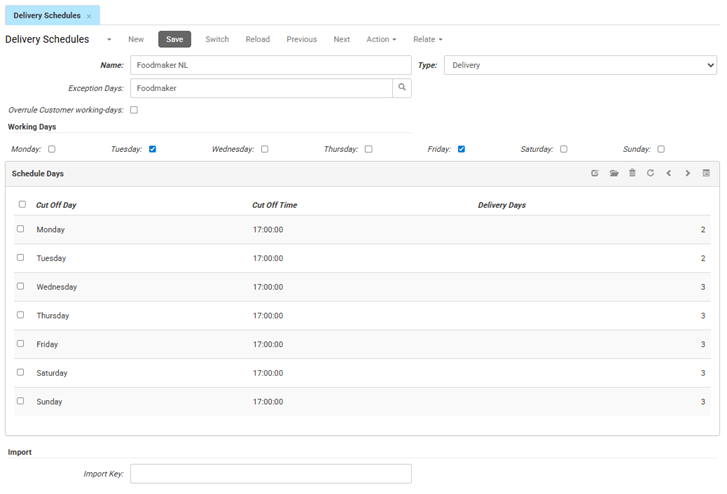
- Name is the internal title for this schedule.
- Type sets the kind of schedule. For a delivery schedule, this is set to Delivery.
- Exception Days links an exception days calendar to this schedule. The system uses these exception days when it calculates the delivery date, for example to skip warehouse closures or public holidays.
- If Overrule Customer working-days is checked, this schedule takes priority over any blocked days set on an individual customer profile. If it is not checked, the blocked days on the customer profile still apply.
Working Days
- Select the days of the week when you deliver.
Schedule Days
- Cut Off Day is the day on which the order is placed.
- Cut Off Time is the latest time an order can be placed to count toward that day's lead time (for example, 17:00:00).
- Delivery Days is the number of lead days needed before the customer can receive the order.
Import
- The Import key is the unique identifier defined for your imports, used to match, retrieve, or update records