Delivery Schedule Checker
The Delivery Schedule Checker simulate an order date and see the first available delivery date for a customer or product.
In the CloudSuite App go to Order Management > Configuration > Delivery Schedule Configuration > Delivery Schedule Checker.
The Delivery Schedule Checker pops up.
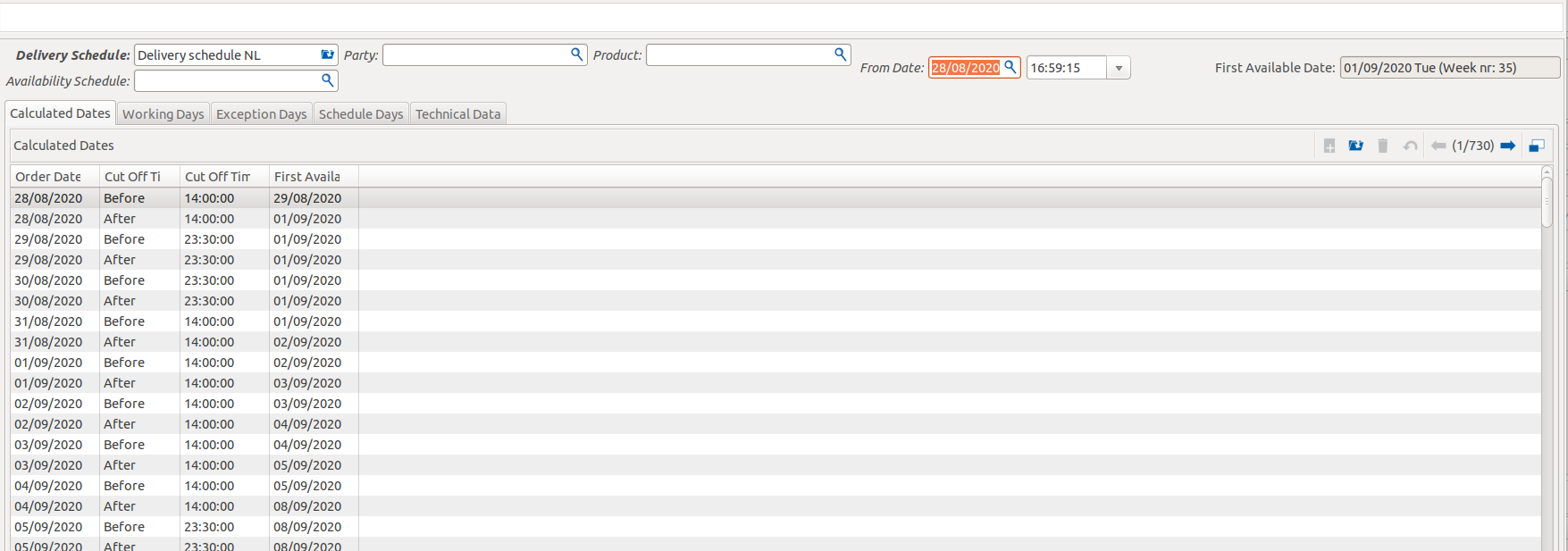
In the top section, you set the parameters to test your schedule:
- Delivery Schedule is the delivery schedule used for the calculation. It fills in automatically when the selected Party has one.
- Availability Schedule is the product availability schedule used for the calculation. It fills in automatically when the selected Product has one.
- Party is the customer whose delivery schedule is used.
- Product is the product whose availability schedule is used.
- From Date is the order date and time used as the start of the calculation.
- First Available Date shows the earliest delivery date the calculation returns.
Schedule Tabs
Use these tabs to review the calculated output and see which rules were used:
- Calculated Dates shows a list of the simulated Order Date, the applicable Cut Off Time, and the resulting First Available Date.
- Working Days shows the working days used for the calculation.
- Exception Days shows excluded days, such as holidays or non-delivery days.
- Schedule Days shows the recurring delivery days defined in the schedule.
- Technical Data shows technical details used for support and troubleshooting.
Actions
- Check Date runs the calculation with your selected inputs.
- Ok closes the checker.