Cost Rules
The Cost rules screen lets you configure additional order costs, surcharges, discounts, and delivery options that are applied to webshop orders.
Each webshop in CloudSuite Admin can use an individual cost rule, or multiple webshops can share a single rule. If you do not configure a cost rule, the system does not calculate order costs by default.
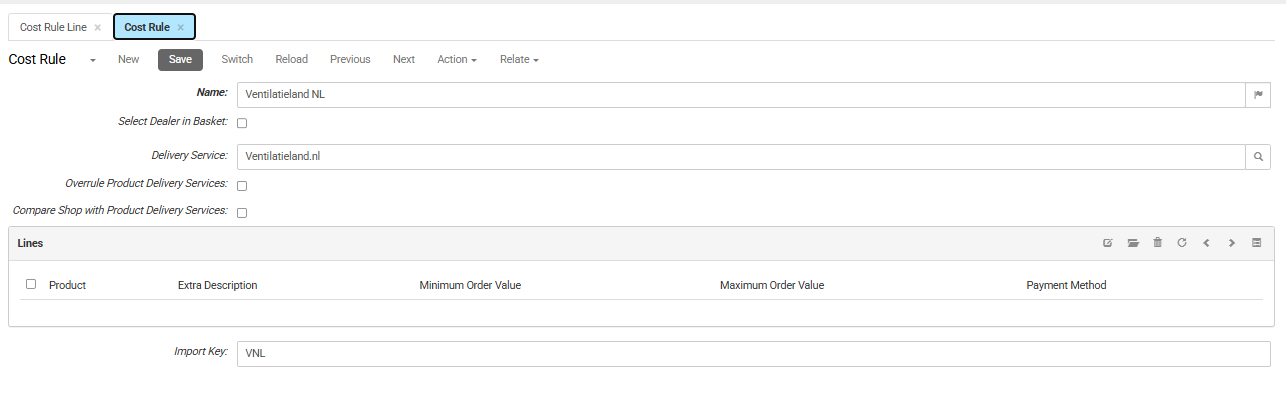
-
In the CloudSuite App, go to Order Management > Configuration > Cost rules.
Click New to create a cost rule, or double-click an existing cost rule to edit*.*
- Name is the internal name for the cost rule.
- Check Select Dealer in Basket to allow webshop users to select a dealer in the basket, for example as a pickup point.
- Select the Delivery Service for this cost rule. The delivery service sets which delivery options are available in the basket and checkout, and how delivery costs are calculated.
Note: If the webshop uses external delivery through Delivery Match or a carrier web service, internal delivery services are skipped, and the delivery options are provided by the external service.
- Check Overrule Product Delivery Services if this cost rule must override any delivery services set on individual products in the basket.
- Compare Shop with Product Delivery Services compares the priority. between the webshop and product delivery services (highest priority applies). For example, if a product has a higher-priority free-shipping service, the webshop delivery fee is not applied. This option is available only when Overrule Product Delivery Services is cleared.
Lines
The Lines section contains the additional costs and discounts included in the cost rule.
Click the edit icon to open the Cost Rule Line window.
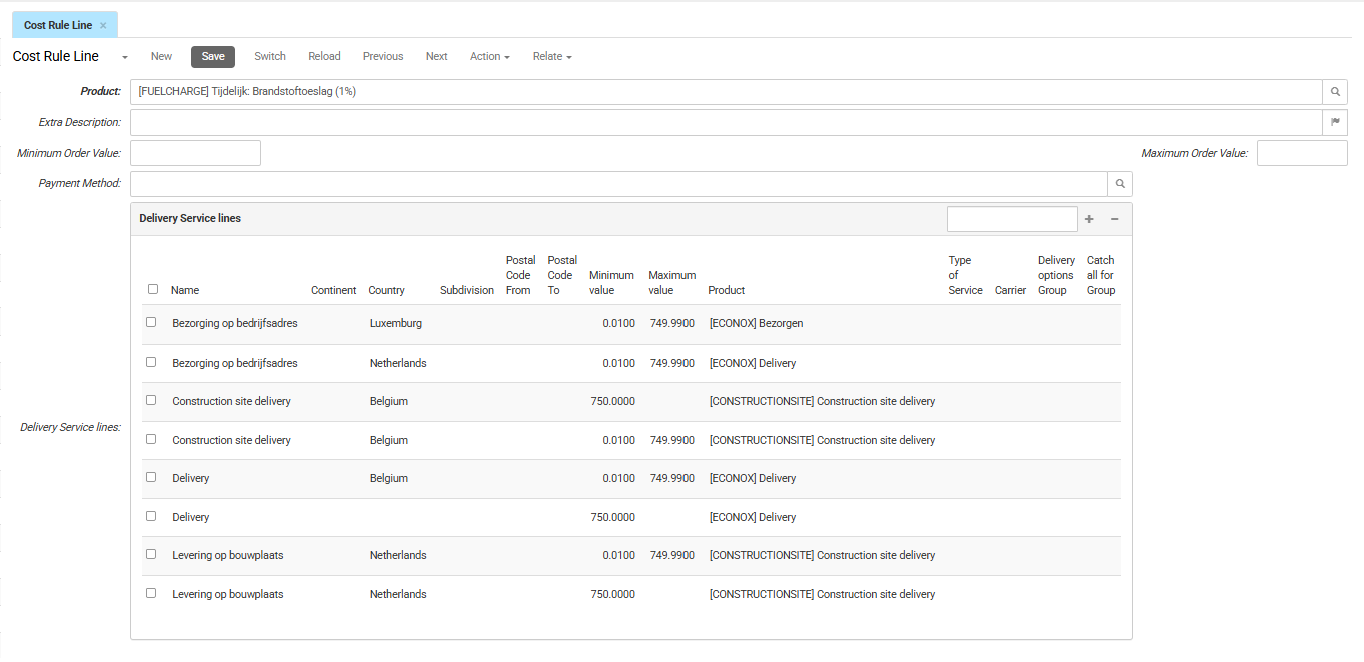
- Product is the service product for this order cost or discount.
The configuration of the selected product determines whether the line is applied as a surcharge or discount, and whether it uses a fixed amount or percentage.
- Extra Description is the label shown in the basket and checkout (for example, "Shipping Costs"). Click the flag icon to add translations.
- Minimum Order Value is the minimum basket value required for this line to apply.
- Maximum Order Value is the maximum basket amount at which this line no longer applies.
- Payment Method restricts the line to a specific payment method. For example, select Credit card to apply a payment surcharge only when the customer chooses credit card payment during checkout.
- Delivery Service Lines restricts the additional cost or discount to specific regions or delivery methods. Click the + icon to add a delivery service line.