Sale Type Substitutions
Sale Type Substitutions replace the cost rules linked to the webshop Sale type, with a different cost rule. Assign the substitution to a customer or delivery address to use it.
In the CloudSuite App, go to Order Management > Configuration > Sale Type Substitutions. The overview lists the existing substitutions. Click New to create a substitution, or double-click an existing substitution to open it.
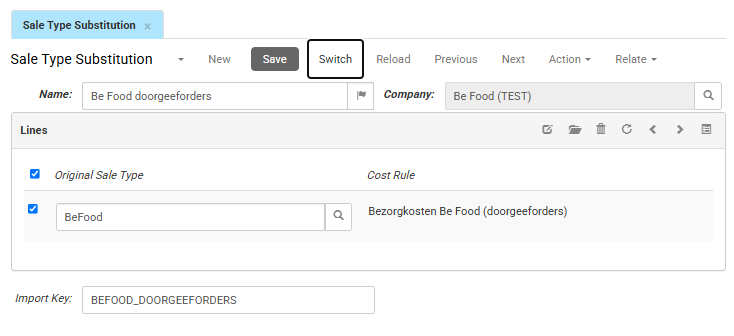
General settings
Name is the internal name of the sale type substitution.
Company is the operating company to which the substitution belongs. If only one company is available, there is only one option.
Import Key is the unique identifier used to match, retrieve, or update the substitution during imports.
Lines
The Lines section contains the sale types and replacement cost rules included in the substitution.
- Original Sale Type is the sale type whose standard cost rule is replaced.
- Cost Rule is the cost rule used instead of the cost rule configured for the original sale type.