Quotation Configuration
Use this screen to define how quotations are handled per webshop.
Go to Order Management > Quotations > Quotation Configuration.
An overview appears, listing all shops for which quotation settings have already be defined. Open a configuration to view or change its settings or click New to create a new one.
- Shop field indicates which shop the quotation settings apply to. All configuration options on this screen are stored at shop level.
- Quotation Internal Reference: allows you to select the numbering sequence used for quotation IDs. This sequence defines how quotation numbers are generated in the Admin and is for internal use only.
- Number of Characters Name: determines the maximum length allowed for the quotation name entered by the user.
- Name is required: when ** ** enabled, customers must enter a name before submitting a quotation.
When disabled, the quotation name is optional. - ERP is Responsible: when enabled, accepted quotations are sent to the ERP system. The ERP processes each quotation into an order and returns it to CloudSuite as an offline order. It is no longer possible to convert an accepted quotation into an actual order via the check-out process.
- Price Request Mode: when enabled, the quotation flow hides prices and totals to prevent zero-value amounts from being shown. When disabled, the standard quotation flow is used and prices are visible.
Sequences
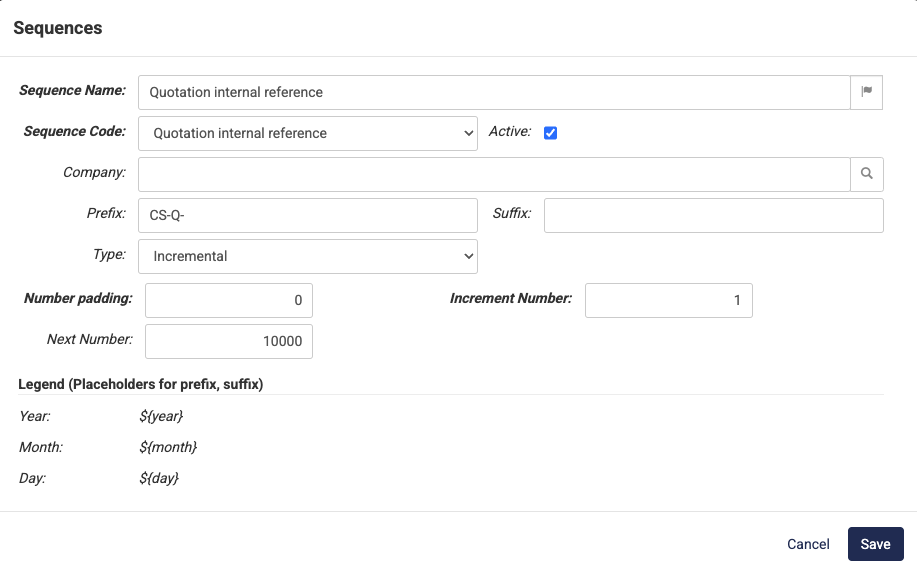
When you click the magnifying icon next to Quotation Internal Reference, the Sequences screen opens. Here you define how quotation numbers are generated.
- The Sequence Name and Sequence Code identify the sequence internally. These values are not visible to customers.
- Use Prefix and Suffix to create a recognizable quotation format. You can include date placeholders such as
${year},${month}, and${day}in these fields. - Type: determines how numbers are generated. For quotations, this is typically Incremental. The Next Number field defines the next number that will be assigned to a newly created quotation, while Number Padding allows you to add leading zeros if desired.
- Increment Number: sets how much the sequence increases each time a new quotation is created.