Availability Exceptions
On this screen, you configure exception days for availability schedules. An availability schedule sets the production or preparation lead time for a product, so an availability exception changes that lead time for a specific date. Use availability exceptions to:
- block a production day
- change the cut-off time for a specific date
- change the production lead time (Delivery Days) for a specific date
To change the delivery calendar, use Delivery Exceptions instead.
In the CloudSuite App, go to Order Management > Configuration > Delivery Schedule Configuration > Availability Exceptions.
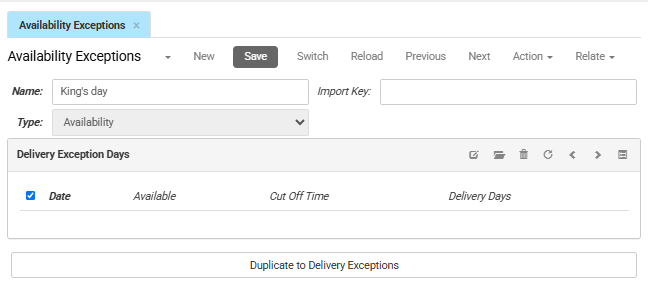
- Type sets the kind of exception. For an availability exception, this is set to Availability.
- Import key is the unique identifier defined for your imports, used to match, retrieve, or update records.
Delivery Exception Days
This tab shows a list of delivery exception days. To add one, click New.
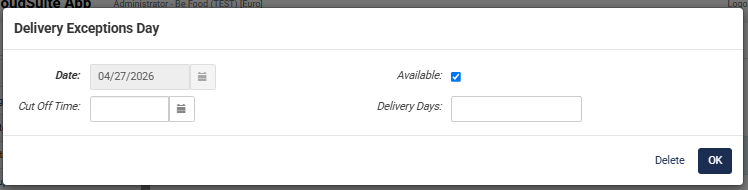
- Date is the calendar date the exception applies to.
- If Available is checked, the date is a working day. If it is not checked, the date is a non-working day and does not count when the system calculates the lead time.
- Cut Off Time is the latest time an order can be placed to count toward that day's lead time (for example, 12:00:00). If filled, this overrides the standard cut-off time for that date.
- Delivery Days is the number of lead days needed before the product can be made available. If filled, this overrides the standard lead time for that date.
If a date is in this list but Available is not checked, the system treats it as a blocked day. The date does not count as a working day when the system calculates the lead time.
Duplicate to Delivery Exceptions creates a copy of this availability exception, including its exception days, as a delivery exception.