Pending Reviews
Pending reviews allow you to moderate customer feedback before it becomes visible in the webshop.
Go to Reviews > Pending Reviews. An overview appears, listing all customer submissions that are waiting for approval.
Double-click a review to open it. You can approve or reject it.
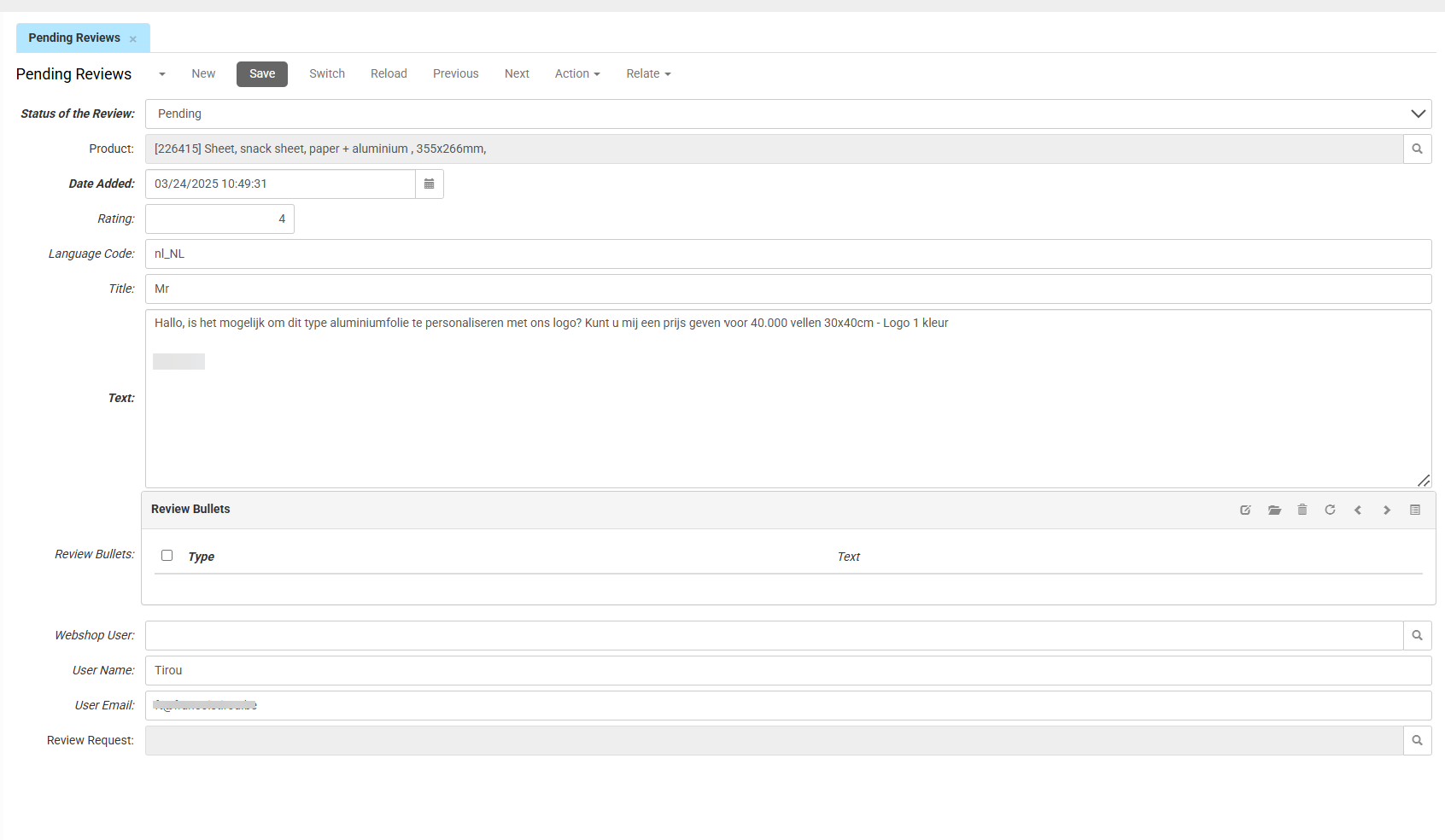
-
Status of the Review determines whether the review is visible in your webshop. Use the dropdown menu to set it to Approved to publish the review, or Rejected to hide it.
CautionYou must review the content before setting the status to Approved. When you set the status to Approved, the review becomes visible on the product page immediately.
-
Product shows the product that the review is linked t
-
Date Added shows the date and timestamp when the customer submitted the review.
-
Rating shows the numerical score given by the customer.
-
Language Code shows the language in which the review is written.
-
Title shows the headline entered by the customer.
-
Text shows the full body of the customer's review.
Review Bullets
- Type indicates the classification of the bullet (e.g., positive or negative).
- Text shows the comment for that bullet point.
Use the toolbar to edit or remove bullet points.
User Information
- Webshop User links to the customer profile.
- User Name and User Email show the contact details that the customer provided when submitting the review.
- Review Request indicates whether the review was submitted through an automated post-purchase email.