External Product Index
To work with external product mappings, in the CloudSuite App go to PIM > External product index. An overview appears, listing all mappings that have already been defined. Double-click an existing mapping to open its details or click New to create a new one.
Use this to map CloudSuite products to external codes and descriptions used in your ERP or procurement systems. This ensures customers see familiar terminology and follow mandatory ordering rules in the webshop.
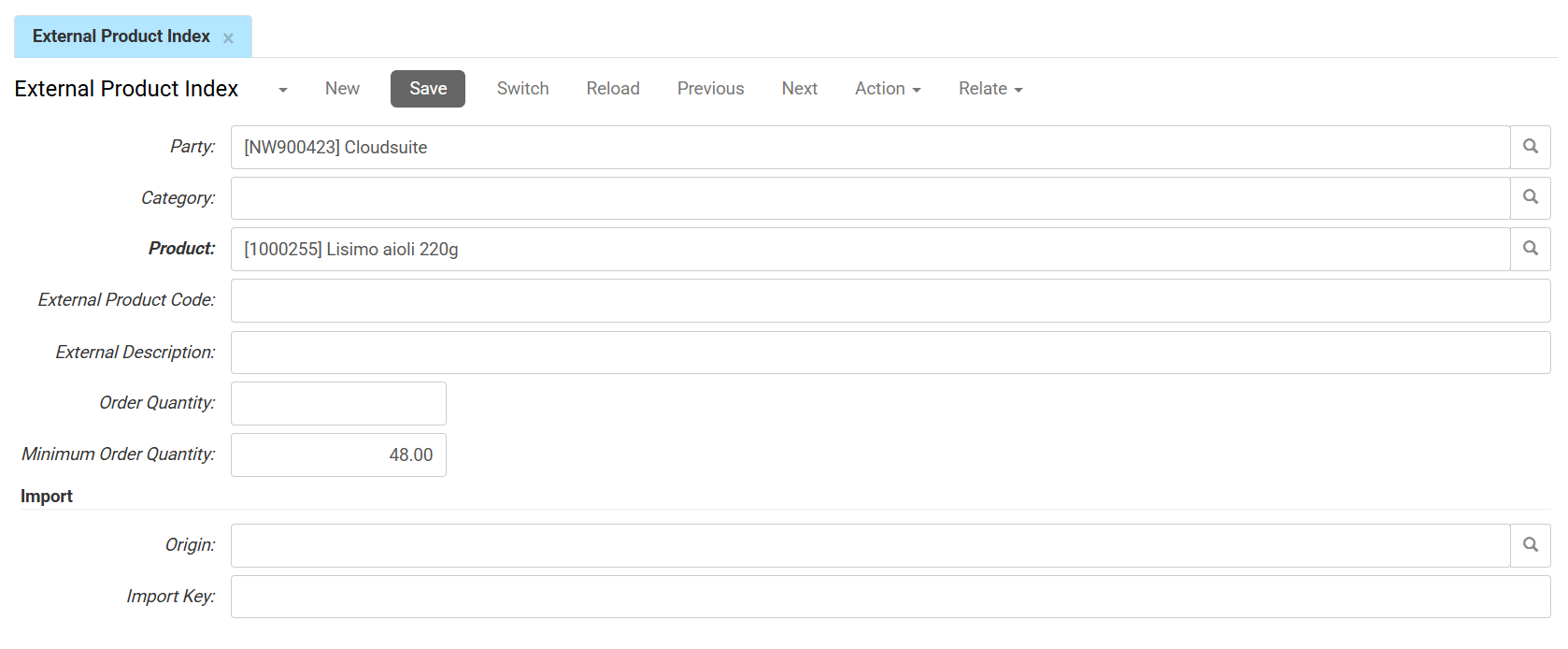
Mapping Context
- Party (Customer) sets the specific customer for whom this external mapping applies.
- Category links this mapping to a specific product category (optional)
- Product sets the product record being mapped.
External System Information
-
External Product Code is the specific SKU or item number used in your ERP or procurement system.
-
External Description sets the product name displayed on the webshop, overriding the standard product name.
-
Order Quantity is the required multiple for ordering this product. (e.g., if set to 10, the customer can only order 10, 20, 30, etc.)
-
Minimum Order Quantity sets a mandatory minimum amount for orders. The customer will not be able to order less than this amount for this specific item.
Import and Metadata
-
The Origin identifies the source system, company or administration that supplied this record. In multi-administration or multi-entity setups, multiple origins may apply.
-
The Import key is the unique identifier defined for your imports, used to match, retrieve, or update records.