Web Services
Web services profiles set up the integrations between CloudSuite and external platforms, such as tax calculation services or delivery management systems.
In the CloudSuite App, go to Other Settings > Web Services. An overview appears of all exixting service profiles. Select an existing profile to edit it, or click New to create a new profile.
Creating new web services
Users with the appropriate authorisation can create their own web service profiles.
It is however recommended that Admin users define and manage these profiles, as web service configuration requires expert knowledge.
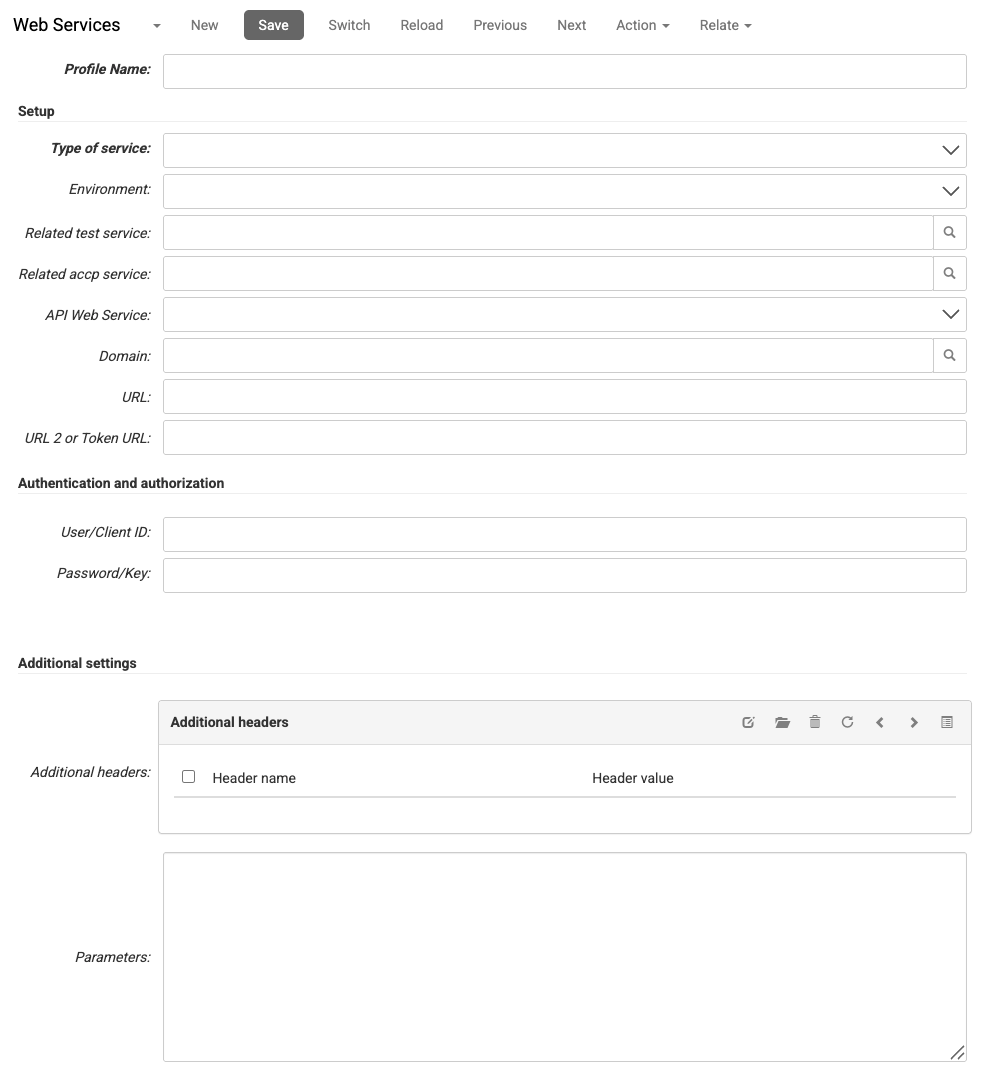
- Enter the Profile Name to recognize the service profile in the overview.
- The Type of Service determines the type of integration (e.g., Internal, FTP Server, or DeliveryMatch). The system shows different additional fields depending on your selection.
- For the Environment select; Acceptance, Production, or Test. The system uses this value to determine which environment is used for the connection
Note
The URLs for both Test and Production are pre-configured and known by the system based on this selection.
- You can link a Related test service or Related accp service to maintain a clear connection between your different environment profiles.
- When applicable:
- API Web Service determines the specific service type and integration logic to be applied from the dropdown menu.
- Domain select a domain if the integration is linked to a specific webshop domain in your environment.
- URL specifies the primary endpoint address for the external service.
- URL 2 or Token URL specifies the secondary address used for authentication tokens or OAuth requests if required by the service.
- Path External System specifies the directory path on the FTP server where files should be placed or retrieved (e.g.,
/outgoing/orders). Only applicable when the Type of Service is set to FTP Server. - File type sets the format of the files exchanged with the FTP server (e.g., CSV, XML). Only applicable when the Type of Service is set to FTP Server.
- External Server Encoding sets the character encoding used by the FTP server when reading or writing files (e.g., UTF-8, ISO-8859-1). Only applicable when the Type of Service is set to FTP Server.
- Product links a Service Product to add the retrieved value to the sales order.
Authentication and authorization
- Enter the User/Client ID provided by the external service provider.
- Enter the Password/Key, e.g. such as a secret password, API key, or client secret used to authorize requests.
Additional settings
- Additional headers add HTTP headers with each request. Each header consists of a name and a value.
- Header name enter the name for the header (e.g.
Accept). - Header value enter the value for the header (e.g.,
application/json).
- Header name enter the name for the header (e.g.
- Add one or more fixed Parameters that are included in each request.
- Select the service Product. The system adds this product as a service line in the order when the integration returns a value