Attribute Groups
Attribute groups allow you to bundle individual properties (like "Dimensions," "Material," or "Technical Specs") into logical groups that are easier for customers to browse.
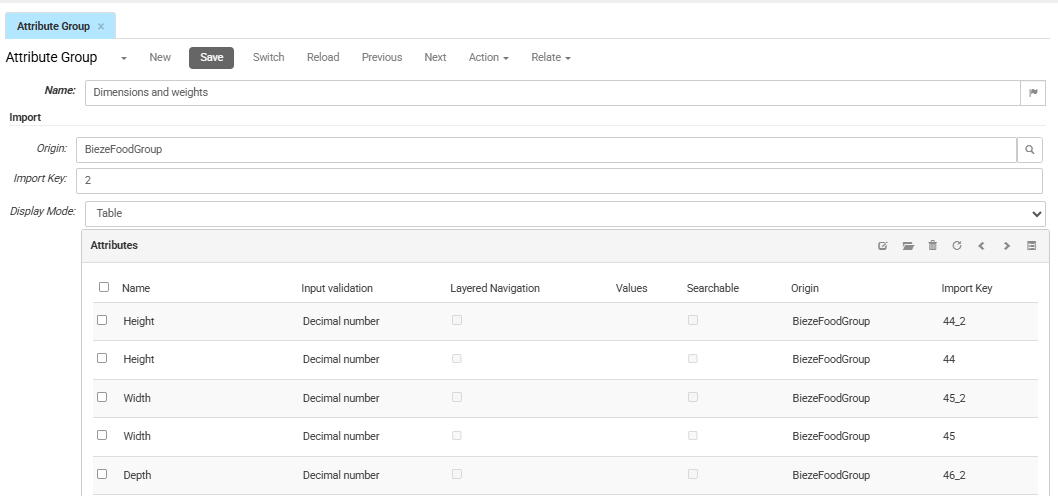
To manage attribute groups, in the CloudSuite App go to PIM > Attributes > Attribute Group. An overview appears, listing all attribute groups that have already been defined. Double-click an existing group to edit it or click New to create a new one.
-
Enter the Name of the attribute group. This title can be displayed as a heading on your Product Detail Page (PDP) and can be translated for localized shops by clicking the flag icon.
-
The Origin identifies the source system, company or administration that supplied this record. In multi-administration or multi-entity setups, multiple origins may apply..
-
Import Key shows the unique technical identifier used by the external system for synchronization.
-
Display Mode determines how this group appears on the frontend (e.g., as a list or a table). This allows you to control the visual layout of your technical specifications for your customers.
Attributes
This section lists all the individual attributes that belong to this group. You can manage them using the toolbar icons above the list.