RMA Configuration
Use the RMA configuration screen to define how return requests are handled per webshop.Go to Order Management > RMA > RMA Configuration. An overview appears, listing all webshops for which RMA settings have already been defined. Open a configuration to view or change its settings, or select New to create a new one.
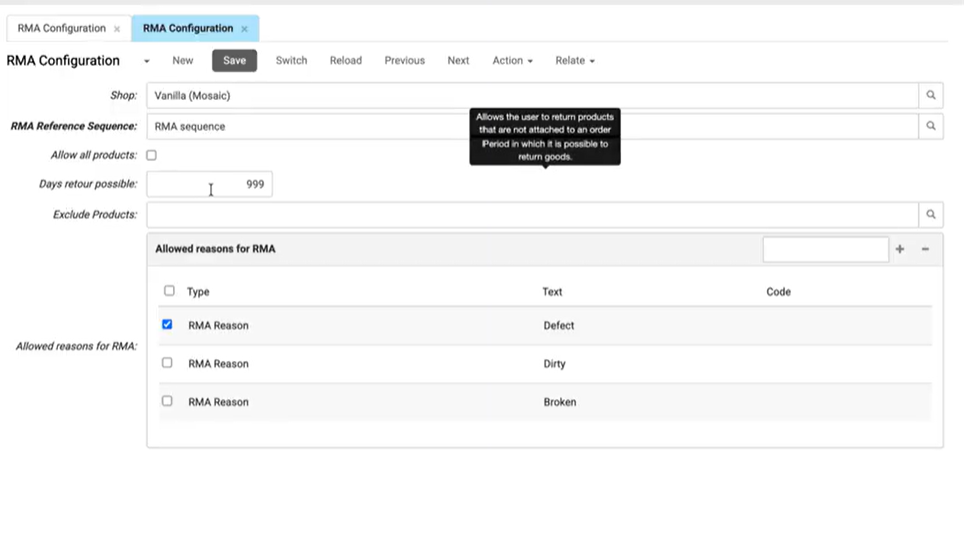
- Webshop indicates which webshop the RMA settings apply to. All configuration options on this screen are stored at webshop level.
- RMA Reference Sequence allows you to select the numbering sequence used for RMA reference numbers. This sequence defines how RMA numbers are generated when customers submit return requests.
- If Allow All Products is checked, the customer can request a return for products that were not ordered through the webshop, such as products bought through another sales channel or returned at a service point. If it is not checked, the customer can request a return only for eligible products from webshop orders or synchronised ERP orders.
- Days Retour Possible is the number of days after delivery in which a customer can return a product (enter 30 for a 30-day return period).
- Max comment length defines the maximum number of characters a customer can enter in the second comment field (memo 2).
- Exclude Products specifies the product tag that marks products which cannot be returned.
- Allowed reasons for RMA defines the reasons customers can select when submitting a return request. Return reasons are maintained as e-Commerce Texts of type RMA Reason.
- Reason for return specifies the e-Commerce Text of type RMA Reason used for this reason.
- Reason tag limits the reason to products with the selected product tag. If no tag is selected, the reason is available for all products.
- Required attachment requires customers to add a photo before submitting a return request line with this reason.
- The return form can include up to three optional fields for customers to enter additional information. The labels of the memo fields on the return form are defined in the webshop front end, not in the CloudSuite App.
- If Show memo field is checked, the first field appears on the return form.
- If Show memo 2 field is checked, the second field appears.
- If Show memo 3 field is checked, the third field appears.
Allowed reasons
Click the search icon next to Reason for return to select an existing reason or create a new one. New reasons are created in the e-Commerce Text screen with the type RMA Reason.
- Type specifies the type of e-Commerce Text. For return reasons, this is the RMA Reason.
- Active indicates whether the return reason is active.
- Text is the return reason customers see when requesting a return.
- Alternative Text contains an alternative version of the text.
- Code identifies the return reason in the CloudSuite App.
- Import Key identifies the return reason when importing data.
- Description contains additional information about the return reason.
Sequences
The Sequences screen opens from the search icon next to Reference Sequence. Use it to set how RMA reference numbers are built.
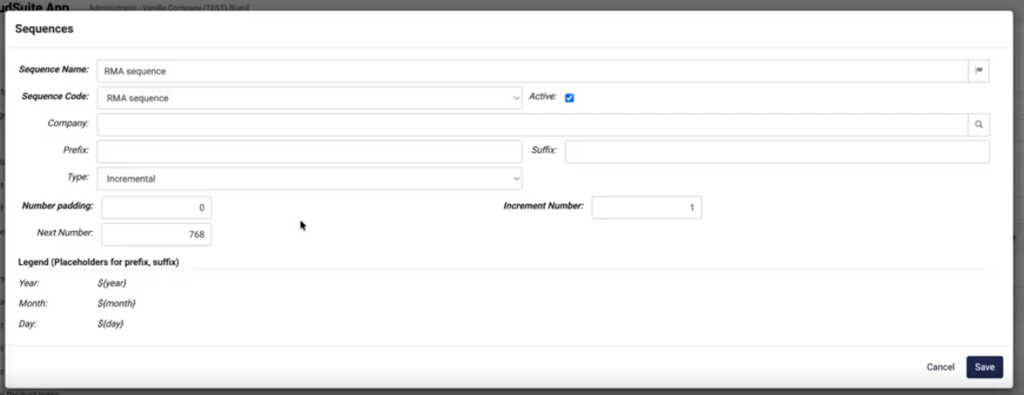
- Sequence Name and Sequence Code identify the sequence inside the CloudSuite App. These values are not shown to customers.
- Use Prefix and Suffix Prefix and Suffix set the format of the RMA reference. You can include the date placeholders
${year},${month}, and${day}. - Type sets how numbers are generated. For RMA references, this is usually Incremental.
- Next Number is the number given to the next new return request.
- Number Padding adds leading zeros to the number.
- Increment Number sets how much the number increases each time a new RMA reference is built.