Search Configuration
Indexing breaks product information (such as names, descriptions, and product codes) into searchable terms. These terms are used to match search queries and return results.
The Search Configuration settings control how product information is indexed and therefore how products can be found in search results.
To specify the search configuration, in the CloudSuite App go to Marketing > Search and Navigation > Configuration.
Search Engine Server Settings
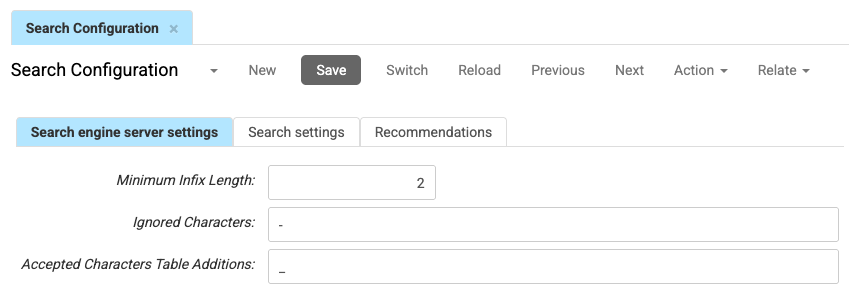
These settings control how product informatio is processed during the indexing process.
-
The Minimum Infix Length defines the minimum substring length used for indexing.
If this value is greater than 0, the search engine indexes substrings from the beginning, middle, and end of words.
A higher value increases index size and may impact indexing and search performance. -
You may specify a list of Ignored Characters (separated by spaces) that are ignored during indexing.
Example: If-is ignored,abc-defis indexed asabcdefinstead ofabcanddef. -
Accepted Characters Table Additions defines additional characters that are treated as part of a word during indexing (separated by commas).
By default, certain characters (such as
-or.) split text into separate words.
When you add a character here, it is no longer treated as a separator.Example:
If-is added,abc-defis indexed asabc-definstead ofabcanddef.
Search Settings
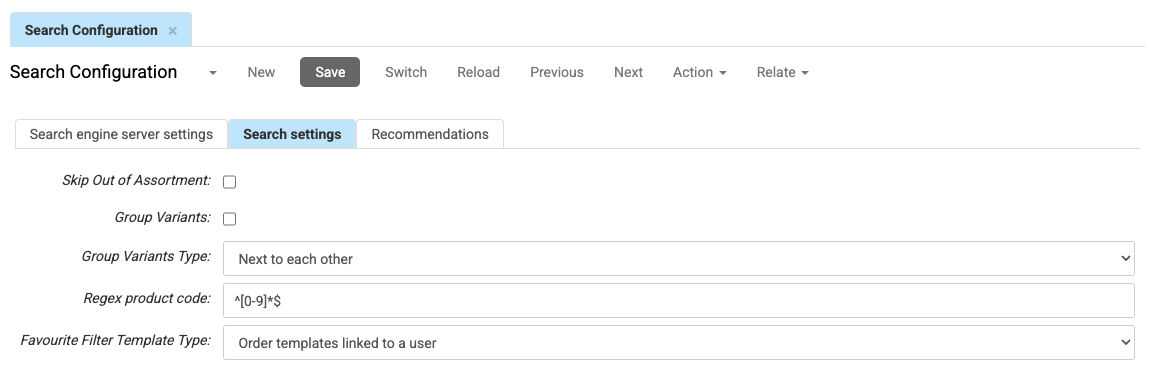
These settings control search behavior in your webshop.
-
If Skip Out of Assortment is checked, out-of-stock products will not be included in search results.
-
If Group Variants is checked, product variants (such as size or color) are grouped into a single product in the search results. Grouping is based on the attributes that define the product variants (for example size or color). You cannot select here which attributes are used.
-
Group Variants Type defines how groupwe variants are displayed in the search results:
- Next to each other displays variants next to the highest found one.
- Standard (unique search) treats a variant as a separate product.
- Grouped (always, ignores unique search attributes) will group variants. The preferred product of the variant is shown regardless of the selected attributes.
- Grouped (not for unique search attributes) groups variants unless a unique filter is applied. If a filter targets a specific variant (for example size), variants are shown separately.
-
Regex product code defines a regular expression used to detect product code searches.
If the search query matches this expression, variant grouping and search suggestions are disabled.Example:
^[0-9]+$matches queries that contain only numbers. When a visitor searches for12345, variants are not grouped and no suggestions are shown.
Recommendations
If you use the Relevance & Recommendations module, this tab lets you specify the Number of months of sale line history that will be taken into account when presenting recommendations.