Attribute Sets
To work with attribute sets, in the CloudSuite App go to PIM > Attributes > Sets with Attributes. An overview appears, listing all attribute sets that have already been defined. Double-click an existing set to open its details or click New to create a new one.
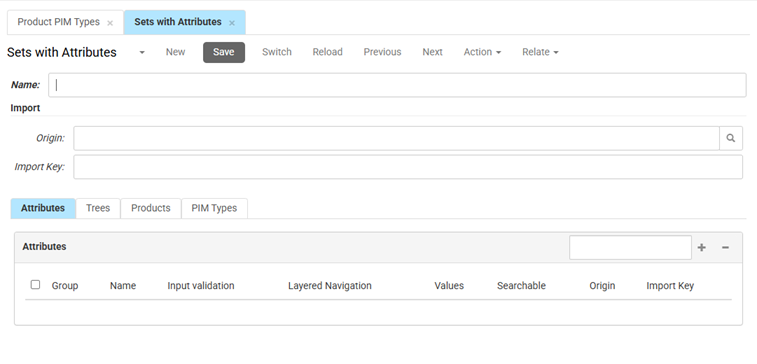
- Name: The Name of the set is for internal reference. This name is used to identify the group of attributes when linking them to Trees, PIM Types or Products.
- Under the Import section, you can enter the Origin and Import Key of the external source of the set with attributes, in case this set has been created by an import.
- Attributes: In this tab, you manage the individual attributes that belong to this set.
- Enter the Name of an attribute to search or click + to see a list of attributes. Check the attributes you want to add, then click OK. To remove an added attribute, select the attribute and then click -.
- Trees: In this tab, you see an overview of which classification trees this set is linked to. Click + or search the name of a tree to link the defined set of attributes to the tree category. Click - to remove the linked tree.
- Products: In this tab, you see an overview of which products this set is linked to. Click + or search the name of a product to link the defined set of attributes to the product. Click - to remove the linked product.
- PIM Types: In this tab, you see an overview of which PIM types this set is linked to. Click + or search the name of a PIM type to link the defined set of attributes the PIM type. Click - to remove the linked PIM type.
- Click Save to save the changes.