Create a Payment Method
Add a new payment method to your webshop - for example iDEAL, a credit card, or Klarna — to make it available at checkout.
Prerequisites
- You have an active account with the payment service provider.
- The payment service base configuration is fully configured under Payment Services > Base Configurations. This includes access tokens, webhooks, and other provider-specific settings.
- You know the payment method code supported by the selected payment service.
Base configurations are usually set up during implementation. Changes may affect existing payments. Only change these settings if you have the required technical knowledge.
Create a Payment Method
- Go to Stores > Payment Services > Payment Methods
- Click New.
- Configure at least the following payment method fields.
- Name: Enter the name shown at checkout
- Service: Select the payment service for this payment method.
- Code: Enter the payment method code provided by your payment service
- Optionally, configure additional fields such as:
- Description
- Minimum amount and Maximum amount
- Visibility conditions
- Allowed Countries
- Allowed Payment Terms.
- Click Save.
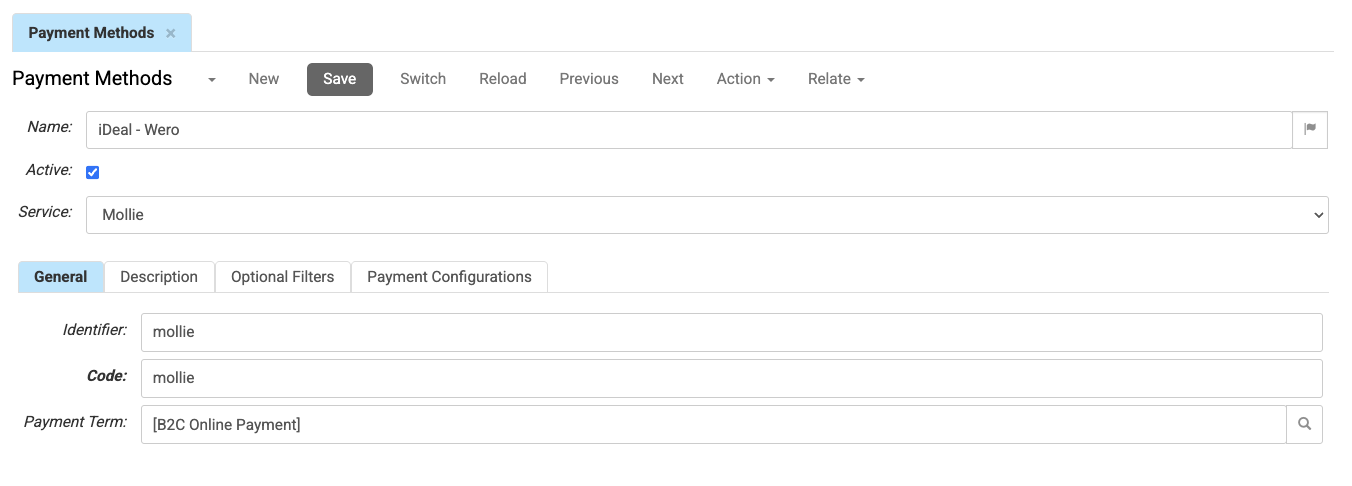
Link the Payment Method to a Payment Configuration
- Open the Payment Configurations tab.
- Link one or more payment configurations to the payment method.
- Click Save.
Payment configurations determine which payment methods and payment services are available for a shop.
You can also manage which payment methods are linked to a payment configuration from the Payment Configuration screen itself.
- Open Stores → Payment Services → Payment Configurations
- Select a configuration,
- Go to the Methods tab to add or remove payment methods.
This is useful when adding several payment methods to the same shop.
Test the Payment Method
- Open a webshop that uses the linked payment configuration.
- Add a product to the basket and continue to checkout.
- Check that the new payment method appears.
If the payment method does not appear, check:
- Whether it is linked to the correct payment configuration.
- Whether conditions such as Allowed Countries, Allowed Payment Terms, or minimum and maximum amounts apply.
- Whether the payment service base configuration is active and complete.
- Whether the configured payment method code is supported by the selected payment service.
The payment method is now available at checkout in every shop that uses the linked payment configuration and meets the configu.