Shop: Order Settings
The Order Settings tab of the shop details contains settings that directly affect the way that orders can be placed in the webshop. Go to Stores > Shops and double-click a shop to open its details.
General
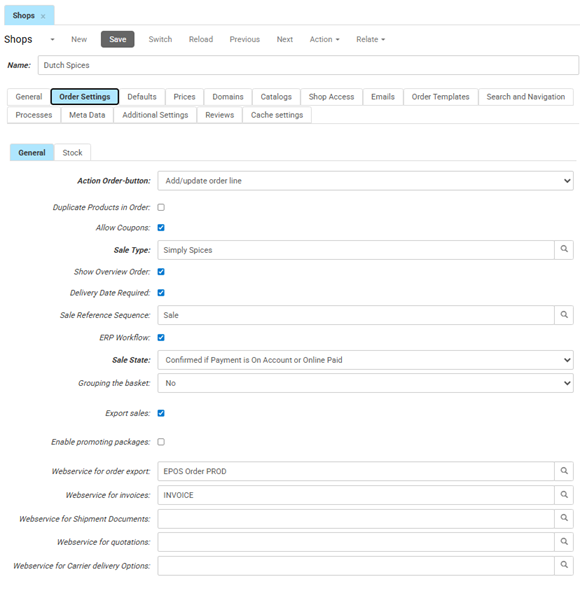
This screen defines the core logic for the shopping basket and external communication during the checkout process.
- Action Order-button determines what happens when a customer clicks the "Add to cart" button (e.g., "Add/update order line").
- Duplicate Products in Order allows the same product to appear as separate lines in the basket. When disabled, the system combines identical products onto a single line.
- Allow Coupons enables the discount code input field in the webshop checkout.
- Sale Type sets the classification for orders placed through this shop, such as B2C Sale Type (NL). This classification determines which cost rules apply. To activate delivery services, open the Sale Type and select or create a cost rule, then add the delivery service to it.
- Show Overview Order shows a summary of the order as the last step of the checkout process. If this is not checked, the system processes the order immediately after the payment or shipping step.
- Delivery Date Required forces a customer to select a preferred delivery date during checkout. The customer cannot proceed to the final confirmation until a date is selected.
- Sale Reference Sequence specifies the numerical sequence used for generating order numbers.
- ERP Workflow indicates whether the order follows a specific automated path defined by your integrated ERP system.
- Sale State sets the initial status assigned to an order immediately after a customer places it, such as Confirmed if Payment is On Account or Online Paid.
- Grouping the basket, determines whether products are grouped in the shopping cart view.
- Export sales enables the sending of order data to external web services or ERP systems. If not checked, orders remain only within CloudSuite Admin and are not pushed to external integrations.
- Enable promoting packages indicates if product bundles or package deals are active for this shop.
- Webservice for order export, selects the integration profile used to push confirmed orders to your external system. This field is only relevant when Export sales is enabled.
- Webservice for invoices manages the connection for generating or retrieving financial documents.
- Webservice for Shipment Documents handles the integration for shipment documents such as packing slips. If you have made shipment documents available in My Account, select the web service that provides them here.
- Webservice for quotations defines the connection for processing B2B price quotes.
- Webservice for Carrier delivery Options selects the web service profile used when working with an external shipping integration.
- Carrier Sort Mode sets the default delivery option shown in the checkout. Select Dropoff - Delivery or another option to set the preferred order. If no sort mode is set, the system shows Delivery first by default.
Stock
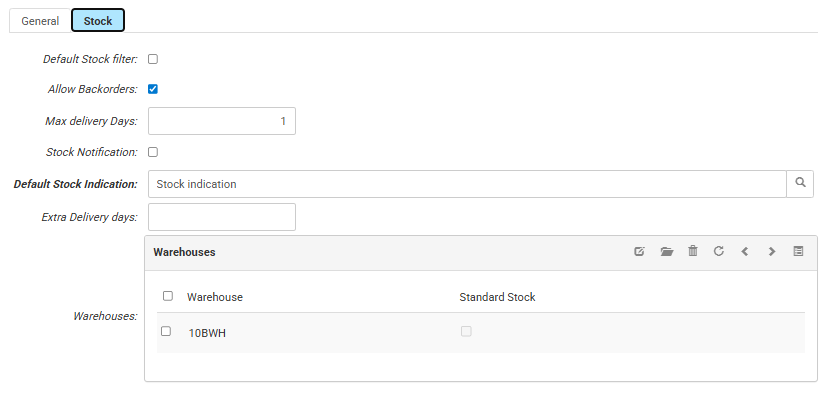
- If Default Stock filter is checked, by default only products that are in stock are shown.
- If Allow Backorders is checked, by default backordering out-of-stock products is allowed. This setting can be overruled for a particular product using the Out of Assortment field in the eCommerce tab of the product settings.