Scan Center Module
Scan Center lets customers scan, search, and order products with a smartphone or tablet. The app is primarily designed to support B2B use in showrooms, at trade fairs, in stores and in warehouses.
It reduces manual work, helps prevent errors, and links physical products directly to your webshop.
Use case
A buyer visits a showroom and wants to remember which products they are interested in. Instead of writing down article numbers or taking photos, they scan the product barcodes with Scan Center.
With direct-to-basket scanning enabled, each product is automatically added to the basket. The buyer can review the basket, add the proper quantities, and place the order at any time, on a phone, tablet, or computer.
Alternatively, you can choose to view the product detail page first, so the customer can review the product and set the quantity before adding it to the cart. The basket and checkout use the existing webshop flow and are displayed within the app.
How it works
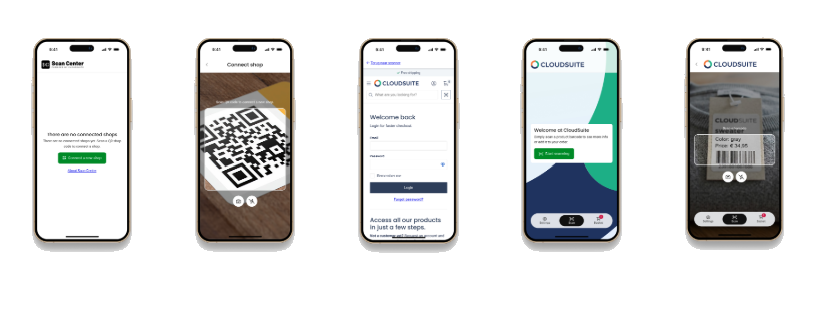
Scan Center is a native app for iOS and Android that connects to webshops on the CloudSuite platform. Customers connect the app to a webshop and log in with their webshop account. This gives the app access to the product information, prices, and stock availability available to that customer.
Barcode scanning takes place directly in the app for a fast, stable scanning experience. Depending on the settings, a scanned product opens in the product detail view or is added directly to the basket. The basket and checkout use the existing webshop flow and are displayed within the app.
Scan Center remembers previously connected webshops, allowing customers to switch between them without reconnecting.
Customers can also connect a handheld barcode scanner via Bluetooth or cable when camera scanning is not practical, for example, when scanning closely positioned barcodes or products that are difficult to reach.
Key benefits
- Scan product barcodes using the camera on a smartphone or tablet.
- View live product information, including images, descriptions, prices, and stock availability.
- Show customer-specific prices after the customer logs in.
- Add scanned products directly to the basket without first opening the product detail page.
- Review the basket and complete checkout from within the app.
- Connect an external barcode scanner via Bluetooth or cable when camera scanning is not practical.
- Switch between previously connected webshops without scanning the connection QR code again.
- Use existing mobile devices without requiring dedicated scanning hardware.
- Apply your own logo and background image for a branded experience.
Contact your CloudSuite implementation partner to activate and configure Scan Center for your webshop.