Search Management
Search Management lets you control how search terms behave in your webshop. You can group related terms as synonyms, define how results are ranked, replace or expand search queries, and exclude unwanted products from results — all from one place.
Use the Top Searches overview to see which terms your customers search for most, so you can focus your configuration on what matters most.
Why use Search Management
Your customers rarely search using one fixed term. They use synonyms, abbreviations, spelling variations, or broader category terms. Without configuration, this leads to incomplete or irrelevant results.
Search Management helps you to:
- Ensure that related search terms return the same products
- Control how exact matches are ranked compared to synonyms
- Expand or replace search queries to improve product findability
- Remove irrelevant products from results for specific terms
- Preview the effect of your changes before publishing them
- Group results by product category and choose which category appears first.
How it works
Search Management has two types of settings: Basic settings and Category ranking.
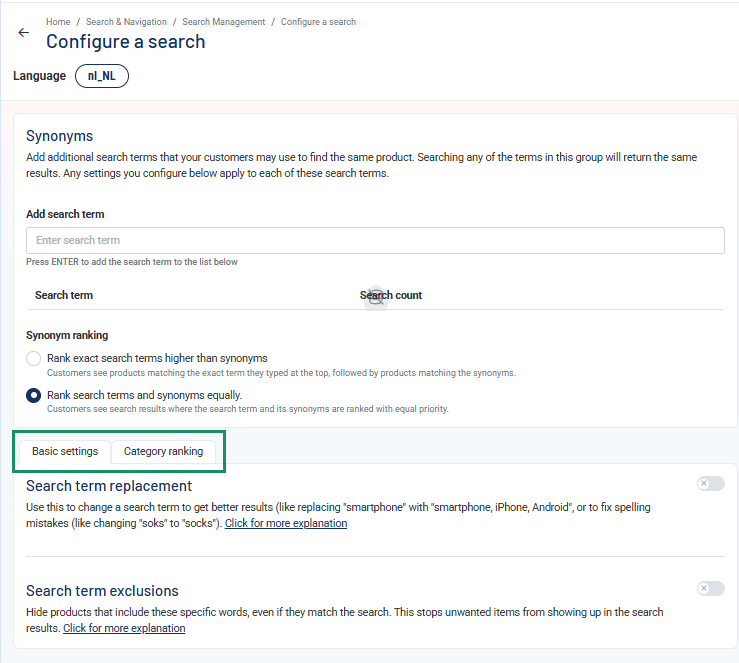
With Basic settings, you configure which products match a search term. You can group search terms as synonyms, replace or expand search terms, and exclude products from the results.
Example:
- Configured terms: patat, friet, frites
- Result: searching for any of these terms returns the same products
With Category ranking, you control the order in which product categories appear in the search results. It does not change which products match the search.
For example, when a visitor searches for banana, you can rank the Fruit category above Drinks and Snacks. Products in the Fruit category then appear first.
Category Ranking is part of the Relevance & Recommendations module and applies when search results are sorted by Relevance.
Configuration Status
Each search configuration can be saved as a draft or published. Published configurations are active in the webshop. If you change a published configuration, the changes only become active after you publish it again.
Key features
- Manage synonyms, search configurations, redirects, and category ranking from one place
- Replace or expand search queries and exclude unwanted results
- Rank product categories to bring the most relevant product groups to the top
- Use Top Searches to identify which search terms matter most
- Preview search results while configuring them, before publishing changes to the webshop